Your Photo Is the Most Common Reason an NZeTA Is Delayed
Every New Zealand Electronic Travel Authority application includes one face photograph. It is checked against your passport image by facial recognition software before a human ever sees it — so a picture that is too dark, too small, badly framed or lightly retouched is enough to hold up an otherwise perfect application. This page sets out exactly what New Zealand accepts, and how to take a compliant photo with a phone in about five minutes.
Apply for Your NZeTANZeTA Photo Requirements in Full
These are the standards Immigration New Zealand applies to every NZeTA photograph. A photo that fails any single row below can be rejected, even if everything else is correct.
| Requirement | What Is Accepted | Why It Matters | |
|---|---|---|---|
| File format | JPG or JPEG only. PNG, HEIC, BMP, TIFF and PDF files are not accepted as the face photograph. | iPhones save as HEIC by default — switch the camera to "Most Compatible" or convert before uploading. | |
| File size | Between 512 KB and 3.14 MB. | Screenshots and messaging-app copies are usually under 512 KB and will be refused as too small. | |
| Shape and orientation | Portrait orientation with a 3:4 aspect ratio — taller than it is wide. | A landscape or square photo will not pass automated checks, however good the image is. | |
| Framing | Head and top of shoulders. Your face must fill 70%–80% of the image and sit in the middle of the frame. | Too far away and the software cannot map your features; too close and your chin or forehead is cut off. | |
| Recency | Taken within the last six months and a true likeness of you now. | An older photo that no longer matches your appearance can trigger an identity check at the border. | |
| Background | Plain and neutral — a light, uniform wall. Only you in the frame: no other people, pets, furniture or objects. | Patterned wallpaper, doorframes and curtains break the outline detection around your head. | |
| Lighting | Even light across your face, with no shadows on your face or on the background, and no red eye or flash glare. | Shadow under the eyes and nose is the single most common fault in home-taken photos. | |
| Expression and pose | Looking straight at the camera, neutral expression, mouth closed, both eyes open, head straight and not tilted. | Smiling changes the geometry of your mouth and eyes and can fail the facial-recognition match. | |
| Glasses | Clear prescription lenses only, with light frames and no glare across the eyes. No sunglasses or tinted lenses. | Reflections hide the eyes, which are the strongest biometric reference point on your face. | |
| Head coverings | Permitted for religious or medical reasons, provided they do not cover your mouth or the sides of your face. No hats or caps. | Your face must be readable from the bottom of the chin to the top of the forehead. | |
| Hair | Hair must not fall across your face or cover your ears, unless you are wearing a permitted head covering. | A fringe over the eyebrows or eyes is a frequent cause of rejection. | |
| No digital alteration | No filters, beauty or smoothing modes, AI editing, feature reshaping, blemish removal, cropping to reposition your face, or object removal. | Immigration New Zealand treats an altered photo as a character concern, not just a technical fault. | |
| Image quality | Sharp, in focus, correctly exposed, with natural skin tone and no visible pixellation or compression blocks. | Photos re-sent through chat apps are compressed and lose the detail the check depends on. |
If you are supplying a printed photo for a paper application instead, the standard print size is 35 mm wide by 45 mm high. The online NZeTA application accepts a digital file only.
Acceptable and Unacceptable Photos
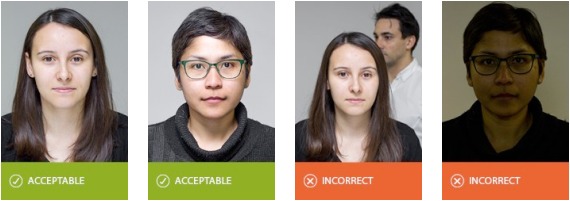
Compare your photo against the examples before you upload it. An acceptable NZeTA photo is unremarkable: a sharp, evenly lit, straight-on picture of your head and shoulders against a plain wall, with nothing to distract the eye.
The most frequent faults we see are:
- Shadow falling across one side of the face or onto the wall behind
- Standing too close to the background, so the head casts a hard outline
- A smile, or the head tilted or turned slightly away from the lens
- Sunglasses pushed up onto the head, or a cap worn indoors
- A second person's arm or shoulder left in the edge of the frame
- A selfie taken at arm's length, which distorts the nose and forehead
Before You Take the Photo
Two minutes of preparation removes almost every common rejection reason.
| Do This First | Why |
|---|---|
| Clean the camera lens | A smudged phone lens produces a soft, hazy image that reads as out of focus. |
| Clear the wall behind you | Remove pictures, switches and coat hooks from the frame, or move to a plain painted wall or a hung white sheet. |
| Choose contrasting clothing | Wear a colour that is not the same shade as the wall, so your shoulders do not blend into the background. Avoid busy patterns. |
| Tie back or clear your hair | Your eyebrows, eyes and the outline of your face must be visible. |
| Decide about glasses | If your lenses reflect at all, take them off. It is faster than fighting glare. |
| Switch iPhone format to JPG | Settings → Camera → Formats → Most Compatible. Otherwise your photo saves as HEIC and will not upload. |
| Turn off beauty and filter modes | Many phones apply skin smoothing by default in the front-facing camera. That counts as digital alteration. |
How to Take Your NZeTA Photo with a Phone
- Stand away from the wall. Position yourself about half a metre in front of a plain, light-coloured wall. The gap is what stops your own shadow landing on the background.
- Face the light. Stand facing a window with soft daylight, or two lamps placed either side of the camera. Never use direct sun, and never use an overhead ceiling light on its own — it drops shadow into your eye sockets and under your chin.
- Have someone else hold the camera. Ask them to stand one to one and a half metres away with the phone at your eye level, using the rear camera in portrait orientation. Do not take a selfie: at arm's length the lens exaggerates whatever is closest to it.
- Frame head and shoulders. Leave a small margin of background above your head. Your face should fill roughly three quarters of the image height and sit centred in the frame.
- Look straight down the lens. Neutral expression, mouth closed, both eyes open, head level. Take five or six frames — it costs nothing and gives you a choice.
- Review at full size. Open the photo full screen and check the eyes are sharp, there is no shadow on the wall, and nothing else is in the frame. Then confirm the file is a JPG between 512 KB and 3.14 MB.
Do Not Crop a Group Photo
Cutting your face out of a holiday or wedding photo almost never works. The crop leaves you with a small, low-resolution file, the lighting is rarely even, and repositioning a face inside the frame is itself treated as digital alteration. Take a fresh photo instead — it takes less time than resubmitting an application.
Photos for Babies, Children and Special Circumstances
Every traveller needs their own NZeTA and their own photograph, including newborns. There is no family or group application. The standards are the same, but the practicalities differ.
Babies and Infants
Lay the baby on their back on a plain, light-coloured sheet with no pattern, and photograph from directly above. Nobody else may appear in the frame — no supporting hands, no dummy, no toys. Aim for eyes open and mouth closed, but a young baby's expression is assessed with common sense.
Young Children
Sit the child against a plain wall and photograph at their eye level. Stand behind the camera to hold their attention rather than beside them, so their head stays straight and their eyes look at the lens instead of off to the side.
Medical Conditions
If a medical condition means you cannot open both eyes fully, keep your head straight, or remove a medical head covering, submit the best photo you reasonably can. Be ready to explain the circumstances if you are contacted about the application.
Cruise Passengers
Cruise travellers need an NZeTA regardless of nationality, and the photo standard is identical. Take the photo before you board — cabin lighting and cramped, patterned interiors make a compliant photo difficult at sea. See our cruise ship NZeTA guide.
Why NZeTA Photos Get Rejected — and How to Fix Each One
If your photo is refused, the fix is almost always one of the following.
| Problem | Usual Cause | How to Fix It |
|---|---|---|
| File is too small | A screenshot, a WhatsApp copy, or an image already compressed for email. | Send the original from the camera roll at full resolution, not through a messaging app. |
| File is too large | A DSLR or high-resolution phone image above 3.14 MB. | Export at a slightly lower quality setting, or resize the longest edge, keeping the 3:4 ratio. |
| Wrong file type | An iPhone HEIC file, a PNG screenshot, or a scanned PDF. | Save or convert to JPG. On iPhone, set Camera Formats to "Most Compatible" and retake. |
| Face too small or off-centre | Full-body or half-body shot; head sitting high or low in the frame. | Retake closer so the face fills 70%–80% of the height, centred, with a small margin above the head. |
| Shadows detected | Overhead lighting, or standing right against the wall. | Step half a metre away from the wall and face a window or a pair of side lights. |
| Background not plain | Patterned wallpaper, a doorframe, curtains, or another person in shot. | Move to a plain wall or hang a smooth light-coloured sheet behind you. |
| Eyes not clearly visible | Glare on glasses, a fringe over the eyes, or eyes looking off-camera. | Remove the glasses, clip the hair back, and look directly into the lens. |
| Photo appears edited | Portrait mode, beauty filters, background blur, or AI enhancement. | Retake with every filter and enhancement mode switched off, using the standard camera setting. |
| Blurry or out of focus | Camera shake, a dirty lens, or low indoor light. | Clean the lens, add light, brace the camera or use a support, and retake. |
| Does not match the passport | An outdated photo, or a significant change in appearance. | Use a photo taken within the last six months that reflects how you look today. |
Uploading Your Photo to the Application
On our NZeTA application form, the photograph is uploaded in the traveller details step, alongside your passport information. A "Sample Photo" link next to the upload field shows the same acceptable and unacceptable examples set out on this page.
- Upload one photo per traveller — each applicant needs a separate application and a separate image.
- Use the Preview link that appears after the upload to confirm the correct file went through, especially on a phone.
- Check your photo before you pay. Correcting it afterwards means resubmitting information that has already been sent for assessment.
- Our team reviews your photograph and application details for obvious errors before forwarding them to Immigration New Zealand — but we cannot override the official photo standard, so the image still needs to be right.
Once submitted, you can follow progress at any time with our NZeTA status checker. Most applications are approved within 72 hours; a photo query is the most common reason that stretches longer.
Final Photo Checklist
- Saved as a JPG or JPEG file
- Between 512 KB and 3.14 MB
- Portrait orientation, 3:4 ratio
- Taken within the last six months
- Face fills 70%–80% of the frame, centred
- Plain, light, uniform background
- No shadows on the face or the wall
- Neutral expression, mouth closed, eyes open
- No sunglasses, hats or caps
- Hair clear of the face and ears
- Nobody and nothing else in the frame
- No filters, retouching or AI editing